Deals distributed automatically
Routes new leads to managers evenly or by percentage — respecting each manager's working hours and days. No manual assignment.
What the widget does
Two distribution rules plus a working-hours calendar — so leads reach the right manager at the right time.
Round-robin distribution
New deals are assigned to selected users in turn — equally, without any manual assignment.
Percentage-based distribution
Set a share for each manager — for example, 50/30/20 — and the widget maintains those proportions.
Distribution calendar
Specify working hours and days for each manager. Deals don't go to them on days off or outside their schedule.
Runs via a pipeline trigger
Distribution is configured as a trigger in the digital pipeline — fires automatically at the right stage.
Simple day exceptions
Mark the days in the calendar when a manager is not taking deals. By default, leads flow unless a restriction is set.
Flexible for your team
The calendar is optional: you can use distribution rules alone or combine them with a schedule.
How it looks in Kommo
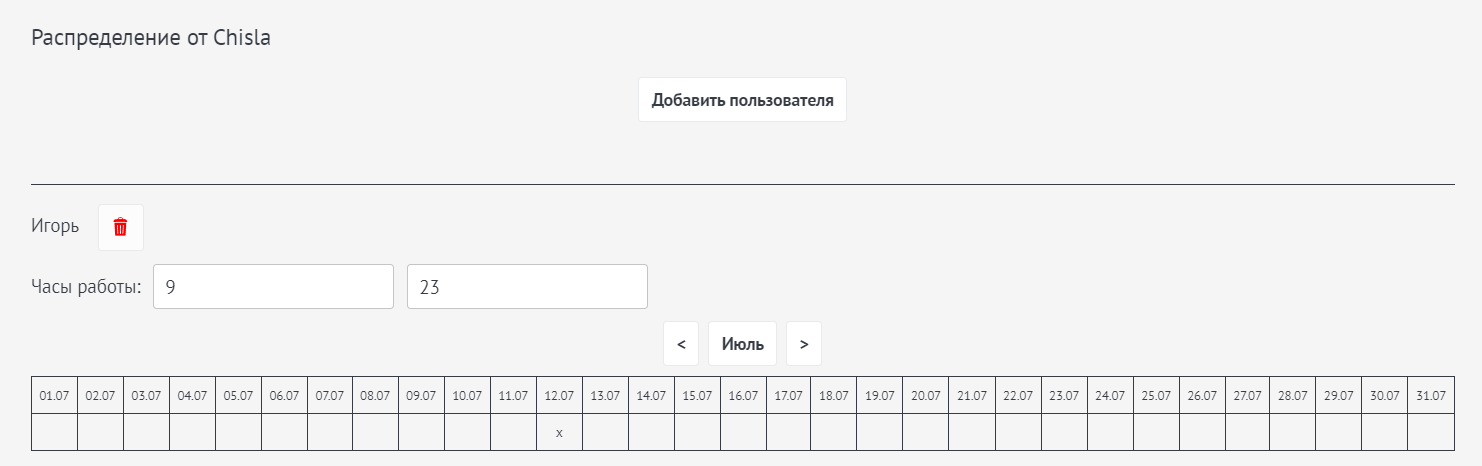
The settings interface is available in Russian and English; the screenshot shows the Russian version.
How it works
We install the widget
We set up Distribution in your Kommo — all you need to provide is admin access.
We choose the rule
We decide together: round-robin or percentage-based distribution among managers.
We configure the calendar
If needed, we set working hours and days for each manager in the "Settings — Distribution" section.
We add a pipeline trigger
We create a distribution trigger in the digital pipeline — and new deals are assigned automatically.
Pricing
Good to know
- Works via a digital pipeline trigger — requires Kommo Advanced plan or above
- Two rules: round-robin or percentage-based
- Working-hours and days calendar — optional
- We can customise the widget to fit your process if needed
Installation, billing, and technical support for Distribution.
Frequently asked questions
What rules can deals be distributed by?
Two rules are available: round-robin (evenly in turn among selected users) or by percentage (you set each manager's share). Both options can be combined with a distribution calendar that specifies each manager's working hours and days.
What is the distribution calendar?
It is a separate option in the "Settings — Distribution" section. For each manager you specify their working hours and mark with an X the days when deals should NOT be assigned to them. By default, leads flow until a restriction is set. Adding users to the calendar is optional.
Does it require a specific Kommo plan?
Yes. Distribution works via a digital pipeline trigger, which is available on the Advanced plan and above.
How do I activate distribution after setup?
Distribution is activated in the digital pipeline automation as a trigger: you select the distribution rule and standard settings, then save the trigger. New deals are then assigned automatically.
What does it cost and is there a trial?
The widget costs $100 per year. A free 5-day trial is available before you pay. If you pay for Kommo through us, the widget is free — ask about the conditions.
Want to distribute leads without manual work?
We'll configure Distribution for your team and schedule. First 5 days free.