Private CHISLA Widgets
Ready-made automation solutions for Kommo CRM. We install them directly in your account and configure everything to fit your workflow — from Google Drive file management to AI-powered sales analytics.
Facebook UTM
Leads from lead forms in Facebook and Instagram ads are often copied into the CRM by hand: some get lost, and the deal never shows which ad brought the client, so nobody knows which campaign pays off. Facebook UTM sends every lead to Kommo the moment the form is submitted, with a contact, a deal and all the ad tags. Then it shows what the ads cost, how many sales they brought and whether they paid off.
- UTM tags on every deal: every tag set in the ad, plus the campaign, ad set and ad names and the placement — Facebook or Instagram
- Facebook and Instagram: a lead-form ad can also run on Instagram — in the feed, Stories or Reels. People fill in the form right there, and the widget picks up the lead the same way
- No lead gets lost: if something fails, the widget retries, and leads that could not be delivered are kept in a separate list with a “Resend” button
- Reconciliation: how many leads Facebook sent and how many reached Kommo — any gap is visible right away
- ROI analytics: by campaign, ad set and ad — leads, sales, conversion, spend, revenue, cost per lead, cost per sale, ROI
- Ad spend is pulled in automatically from your Facebook ad account every hour — no spreadsheets to maintain
- You decide what counts as a sale: any stages in any pipelines; pick a period and export the report to Excel
- Weekly email report and a “costs are rising” alert when cost per lead exceeds your threshold or money is spent with no leads
- No duplicate contacts: the widget looks up the client in Kommo by phone and email and attaches the new deal to the existing contact
- Lead routing: by campaign, form, placement or ad account — its own pipeline, stage, tag and owner (one manager or round-robin)
- Any form field to the right Kommo field: mapping is set up without a developer, and a missing field can be created right in the settings
- Spam filter: a lead without a real phone number or email is tagged or skipped — your choice
- Problem alerts by email, as a Kommo task or in Telegram: Facebook access is about to expire, the lead subscription dropped, no leads for too long
GFilesPlus V2
Managers waste time hunting for contracts, invoices, and photos scattered across folders and messengers. GFilesPlus V2 adds a file panel directly to the deal, contact, and company cards in Kommo: everything related to a client in one place. Files are stored not on a third-party server but in your own Google Drive, where the widget automatically maintains order: a separate folder for each company, contact, and deal.
- File panel on the card — deal, contact, and company, without leaving Kommo
- Automatic folder structure in Drive: Company → Contact → Deal
- File filters: deal only, contact only, company only, or all together
- Upload directly from the card — one file, multiple files, or drag-and-drop
- Preview without downloading: documents and images open in an overlay on top of the card
- Copy a file link with one click — to share with the client
- Deal cover image: star a photo to save it in a designated deal field
- Document generation from templates: a contract or invoice is created from your template with deal data filled in automatically
- Custom templates: an admin uploads Word, Excel, or Google Docs files and manages them in settings
- Flexible display settings: which buttons to show, in what order, whether to display a Drive link
- We install the widget in your Kommo — all you need to provide is admin access.
- We connect your Google account. The widget settings include ready-made code and a step-by-step guide — we walk through it with you. That's why your files stay in your Drive, not ours.
- We configure it for you: which buttons to display, whether to enable document templates, which field to use for the cover image.
- We upload your contract and invoice templates — and managers can generate documents with one click.
AI Analytics
An AI quality controller for your sales team inside Kommo: it reads managers' conversations and grades each one 0–5 daily with examples and advice, flagging doubtful (dropped) losses.
$100 / year or $60 for six months. AI costs are paid separately, directly to the provider (no markup from us).
- Conversation and call analysis: AI reads chats and call transcripts with clients
- Scored against your rules: you describe what "good performance" looks like — the system scores exactly that
- Team leaderboard: a clear ranking of managers — top performers and those who need coaching are immediately visible
- Conversation quotes in the report — every score is backed by specific examples
- "Suspicious lost deals": the widget flags deals where the stated reason for loss looks questionable — a potential dropped lead
- Daily reports: every morning a fresh report for the previous day, with a full calendar view
- Personalised coaching tips for each manager — concrete actions to improve client interactions
- Dedicated page in Kommo Analytics — visible to the whole team
Field Calculator
A manager enters quantity and unit price, then reaches for a calculator and types the total manually — with errors. This widget does the math automatically: you define the formula between deal fields once, and the result updates every time a manager changes any of the source values.
- Math formulas across fields: addition, subtraction, multiplication, division — any combination
- Automatic recalculation the moment a value changes on the card
- Trigger events: on field change, on deal creation, or on moving to a specific pipeline stage
- Works with the system Budget field — the calculated total appears straight in Kommo Analytics
- Smart field search: start typing a field name and the widget suggests the right one
- Multiple formulas at once — for example, total, discount, and commission all in one deal
SUM Widget
Kommo only shows the budget total above each pipeline stage. But if you care about a different sum — for example, prepayments or margin — there is nowhere to see it. SUM Widget displays the total of any numeric field above every stage, and those numbers update automatically as deals move through the pipeline.

- Sum of any numeric field above every pipeline stage
- Two fields simultaneously — for example, budget and prepayment side by side
- Automatic update as deals move between stages
- Colour coding — totals are easy to tell apart at a glance
- Works with both the Budget field and your own custom fields
- Lightweight — optimised to avoid slowing down Kommo
Duplicatecontact
A client writes from a new number or fills out a form again — and a second "John Smith" appears in your CRM. History splits, managers get confused. The widget detects the duplicate the moment it is created and merges the contacts automatically, preserving the entire history without losing anything.
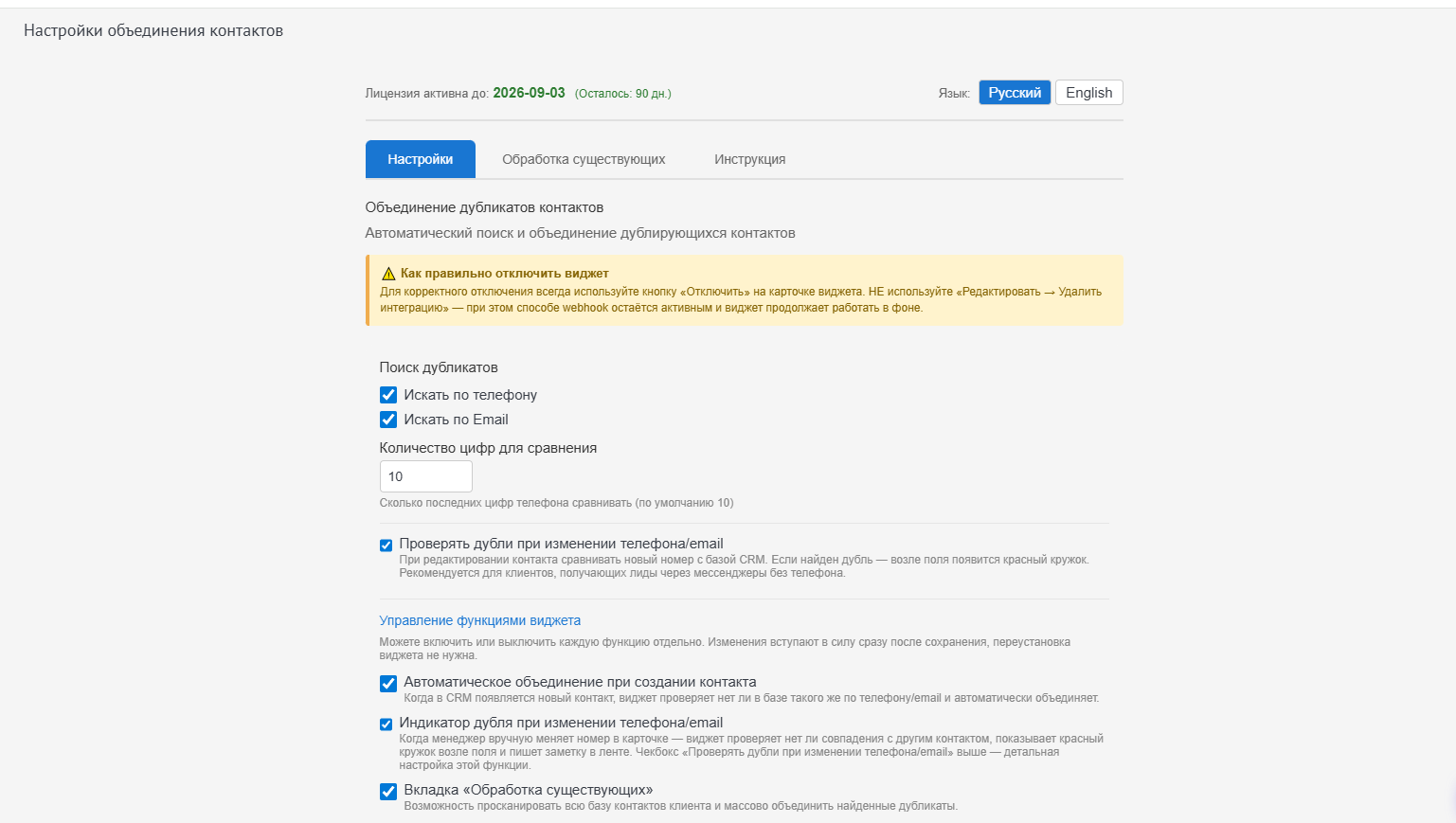
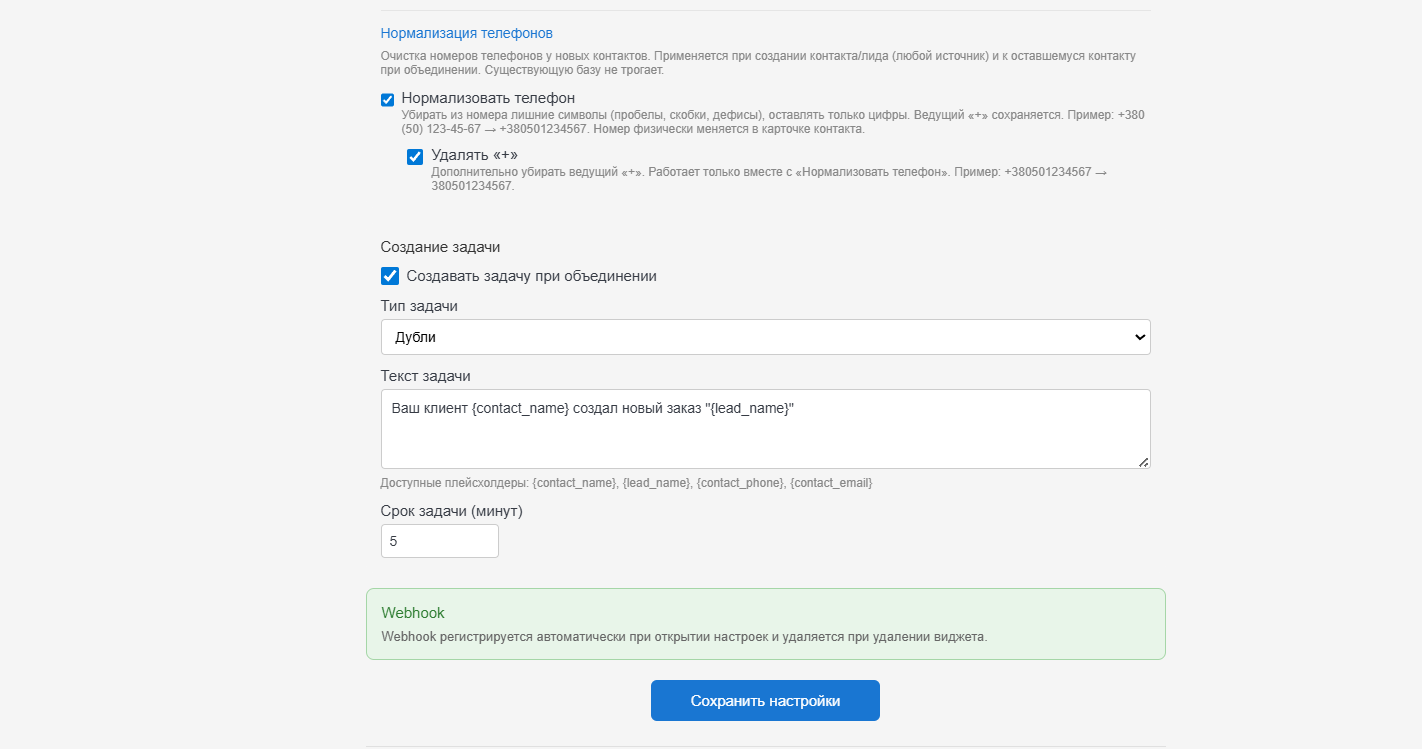
The settings interface is available in Russian and English; screenshots show the Russian version.
- Automatic duplicate detection at the moment a new contact is created
- Auto-merge of contacts — phones, email, custom fields, and history are all consolidated into one contact
- The new deal is linked to the merged contact — nothing is lost
- Responsibility stays with the manager who previously owned the client
- Notification task about the merge — the manager is informed, and the task text is configurable
- Flexible matching rules: by phone and/or email, with configurable digit-count for comparison
- Inline duplicate indicator: when a manager edits a phone number or email, the widget immediately warns about a match with another contact
- Bulk scan: scan all existing contacts and mass-merge duplicates already in your database
- Phone normalisation: numbers on new contacts are formatted consistently — no spaces, brackets, or hyphens
- Chat-safe mode: if a duplicate contact has an active messenger conversation, the contact is not deleted — the widget preserves the chat and prompts a manual merge
Only need monitoring without auto-merge? See the public widget Duplicate Control.
SendPulse Connector
To send a client an email or SMS, managers have to leave the CRM, switch to their campaign tool, and paste contacts manually. This widget connects Kommo to your SendPulse account: messages are sent straight from the deal card, and delivery status appears right there.
- Integration with your SendPulse account — configured once
- Email campaigns from CRM — no need to switch to a separate service
- SMS messages to clients directly from the deal card
- Message templates — managers don't type the same text every time
- Automated trigger campaigns — a message is sent automatically based on a defined event
- Delivery statistics on the deal card — see what was delivered and what was opened
LeadCopy
A returning client places a repeat order — and the manager creates a new deal from scratch, re-entering all the data. LeadCopy clones the deal with one click: all fields and associations with the contact and company are carried over automatically, and you choose which pipeline to place the new deal in.
- Clone a deal with one click directly from the card
- All deal fields are carried over — nothing needs to be re-entered
- Associations are preserved: contact and company remain linked
- Choose the pipeline and stage for the new deal
- Configurable field selection — copy everything or just what you need
- Notes and tasks — optionally included in the copy
LinkMe CRM
Links to a client's website, social profiles, or working documents usually get buried in notes. LinkMe keeps them in a tidy dedicated block on the deal card: all important links always at hand, opened with one click and easy to edit.
- Quick-links block on the deal card — always visible
- Add and edit links directly on the card
- Open with one click — no digging through notes or chat history
How to get a widget
All widgets on this page are private. They cannot be self-installed from the marketplace: we install them individually in your Kommo account and configure them to match your workflow.
Message us
On Telegram — tell us which widget caught your eye and what you want to automate.
We clarify the details
We figure out exactly how the widget should work inside your account.
We install and configure
We handle everything — all you need to provide is admin access to your Kommo.
We support you
Questions or changes needed later? Just message us in the same chat.
Frequently asked questions
A quick rundown of what people typically ask before getting started.
What is a private widget and how is it different from a public one?
Public widgets are installed from the Kommo marketplace and work the same for everyone. A private widget is installed exclusively in your account, and we can configure or customise it for your specific processes — that is its main advantage.
How much does it cost?
Widgets start from $5, and are free when you are on an active partnership with us. The exact price depends on the widget and the scope of configuration — message us on Telegram for a quick quote.
Do I need to install anything on my computer?
No. The widgets run inside Kommo in the browser — no separate software required. We handle the installation in your account.
Can a widget be adapted for my specific business?
Yes. Every widget on this page can be tailored: add a field, change the logic, accommodate a quirk of your pipeline. Describe the task and we'll tell you what's possible.
What if I need something not listed here?
We build custom widgets. Tell us what routine you want to eliminate — we'll propose a solution.
Need a private widget?
Get in touch for individual installation and configuration tailored to your business. Pricing starts from $5, or free with an active partnership.